AS2Go | Lab Setup 1/3 | DC

This post describes how to prepare the Domain Controller (DC) for the attack scenario with AS2Go v2.6

Assuming you already setup an Active Directory you have to do the following steps on your Domain Controller (DC).

  • Create a directory & download files from GitHub
  • Create a share
  • Create alias (cname) and allow Domain Zone Transfer
  • Create dedicated AS2Go Active Directory Groups and Organization Units
  • Customizing the PowerShell (PoSH) Script to create a set of users for an demo attack
  • Create thousands of Demo Accounts
Continue reading

AS2Go | Lab Setup 3/3 | Victim PC

This post describes how to prepare the Victim PC for the attack scenario, to run Pass-the-Hash and Pass-the-Tickets attacks against Admin PC.

Assuming you already finished lab setup 2/3 and setup an Active Directory join workstation (English OS) you have to do the following steps on your Admin PC.

  • Add Victims & Helpdesk Groups to the local administration group
  • Install and Import PowerShell ActiveDirectory & GroupPolicy Module
  • Create a directory & Exclusion regarding Virus Scanner
  • Download files from GitHub
  • Create an shortcuts on the public desktop
  • Copy the help script to %system32% folder
  • Modify the AS2Go Config File
  • Test the AS2Go Posh Script
  • !!!! Download the malware, like Mimikatz.exe !!!!
Continue reading

AS2Go | Attack Scenario To Go

AS2Go is an acronym for Attack Scenario To Go. 
 
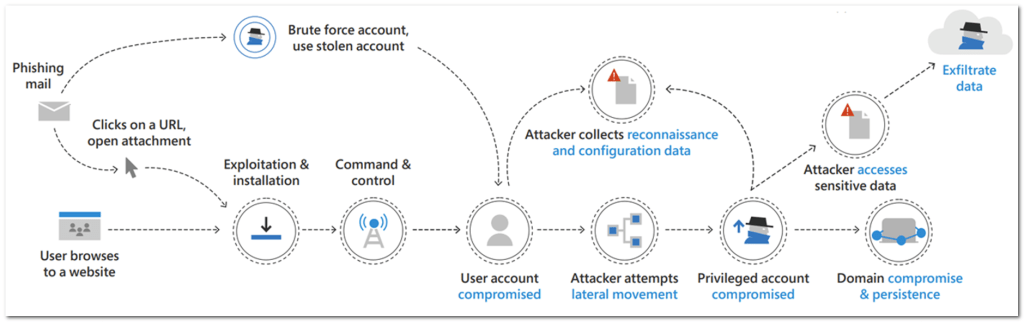
AS2Go is written in PowerShell and goes along the cyber kill chain, with stops at Password Spray, Reconnaissance, Privilege Escalation, Sensitive Data Access & Exfiltration and Domain Compromise.

The GIF shows a typical attack along the kill-chain. Starting with stolen credentials and ending with a compromised domain.

Continue reading

AS2Go | Lab Setup 2/3 | Admin PC

This post describes how to prepare the Admin PC for the attack scenario, to simulate domain activities from Admin PC.

Assuming you already finished lab setup 1/3 and setup an Active Directory join workstation (English OS) you have to do the following steps on your Admin PC.

  • Add Admin & Helpdesk Groups to the local administration group
  • Create a directory & download files from GitHub
  • Create an shortcuts on the public desktop
Continue reading