In den nächsten fünf Minuten möchte ich ihnen zeigten, wie auch Ihre Zero-Trust Reise beginnen könnte bzw. warum das Zero Trust Model von Microsoft so einzigartig ist.
Lateral Movement Paths (LMPs) with Microsoft Defender for Identity (MDI)
I hold this session during the HIP Europe 2021 in June 2021.
Summary
Learn how to identify and investigate Lateral Movement and how to de-risk LMPs using Microsoft Defender for Identity.
Notes
Microsoft Defender for Identity (formerly Azure Advanced Threat Protection, also known as Azure ATP) is a cloud-based security solution that leverages your on-premises Active Directory signals to identify, detect, and investigate advanced threats, compromised identities, and malicious insider actions directed at your organization.
Learn a “life hack” (brute-force attack a overpass-the-hash attack a pass-the-ticket a domain dominance) and how to identify and investigate Lateral Movement and how to de-risk LMPs using Microsoft Defender for Identity.
Here you find my recording, which shows AS2Go v1.x.
AS2Go | Prepare & Test the Ransomware Attack
This post describes how to prepare the Victim PC for the attack scenario, to simulate an ransomware attack against the domain controller.Assuming you already finished lab setup 3/3 | Victim PC⬈ you have to do the following steps on your Victim PC.
- download files from GitHub to c:\temp\AS2Go
- optional create an creates a self-signed certificate
AS2Go | Run over PtH & PtT Attack
This post describes how to handle AS2Go to run the attack!Assuming you finished the attack preparation.
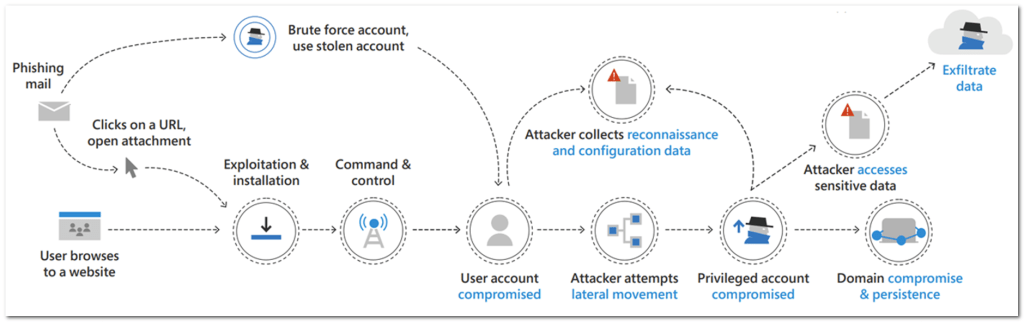
The attack runs step-by-step alone the cyber kill-chain and covers the following attack stages:
Continue readingAS2Go | Prepare the Attack
This post describes how to prepare the lab before you run the attack!Assuming you finished the configuration on DC, AdminPC & VictimPC.
- Create a set of new Victim Users
- Simulate domain activities from Admin PC
- Simulate a working HelpDesk on VictimPC
- Disable Real Time Protection on AdminPC & VictimPC
AS2Go | Lab Setup 2/3 | Admin PC
This post describes how to prepare the Admin PC for the attack scenario, to simulate domain activities from Admin PC.Assuming you already finished lab setup 1/3 and setup an Active Directory join workstation (English OS) you have to do the following steps on your Admin PC.
- Add Admin & Helpdesk Groups to the local administration group
- Create a directory & download files from GitHub
- Create an shortcuts on the public desktop
Set Hyper-V network switch into Promiscuous Mode
In this post I describe how to configure a Hyper-V virtual network switch into promiscuous mode. This mode allows you to monitor external traffic, eg. Needed for Microsoft Defender for IoT.Assuming you already created an dedicated virtual network switch, you have to run these four steps.
- Turn off Allow management operation system to share this network adapter
- Turn off Enable virtual machine queue
- Set port mirroing mode to Destination
- Configure the Ethernet Switch Port Security Settings
My first post
Welcome to my blog,
which will cover topics around Microsoft 365 & Azure Security! Herr HoZi